
AI sermon notes that go beyond note-taking.
Stop trying to write it all down while it is being said. Record the sermon, mark the moments that matter with one tap, and let Sembrae write the notes — summary, outline, Scripture, and what to do about it this week.
Recording is in the iPhone app. On the web, add a link or paste a transcript.
Is there an AI app for sermon notes?
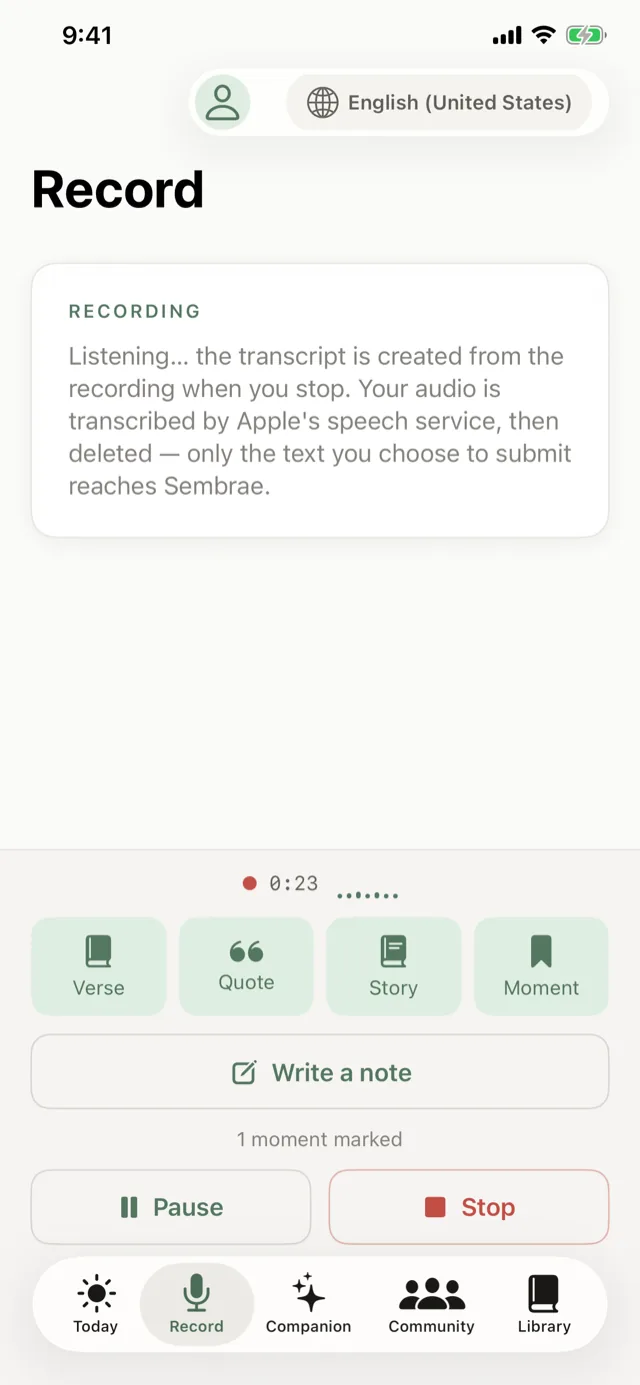
Yes. Sembrae is a free AI sermon notes app for Christians. You record the sermon in the iPhone app — tapping Verse, Quote, Story or Moment when something stands out — or add a sermon link or transcript on the web, and Sembrae writes the notes: a summary of the message, an outline of its points, the Scripture it referenced, and daily next steps. Your markers and journal stay private, and the same sermon can become a devotional or a small group study.
You cannot listen to a sermon and transcribe it at the same time
Anyone who has taken sermon notes knows the trade. You catch the phrase, you miss the next one while writing it. You get the reference down, you lose the point it was making. By the end you have a page of fragments and the feeling of having been half-present for something that deserved all of you.
The instinct is right — the sermon is worth keeping. The method is the problem. Notes should be the result of listening, not a competitor to it.
Sembrae takes the transcribing off your hands and leaves you one job during the sermon: notice. When something lands, tap a marker. Everything else can be written afterwards, from the whole message rather than the half you caught.
Listen on Sunday. Read the notes on Sunday afternoon.
- 01
Record the sermon
Open the iPhone app and start recording when the message begins. On the web, add a link or paste a transcript instead.
- 02
Mark, don’t transcribe
When something matters, tap Verse, Quote, Story or Moment. One tap, timestamped, private to you.
- 03
Get the notes
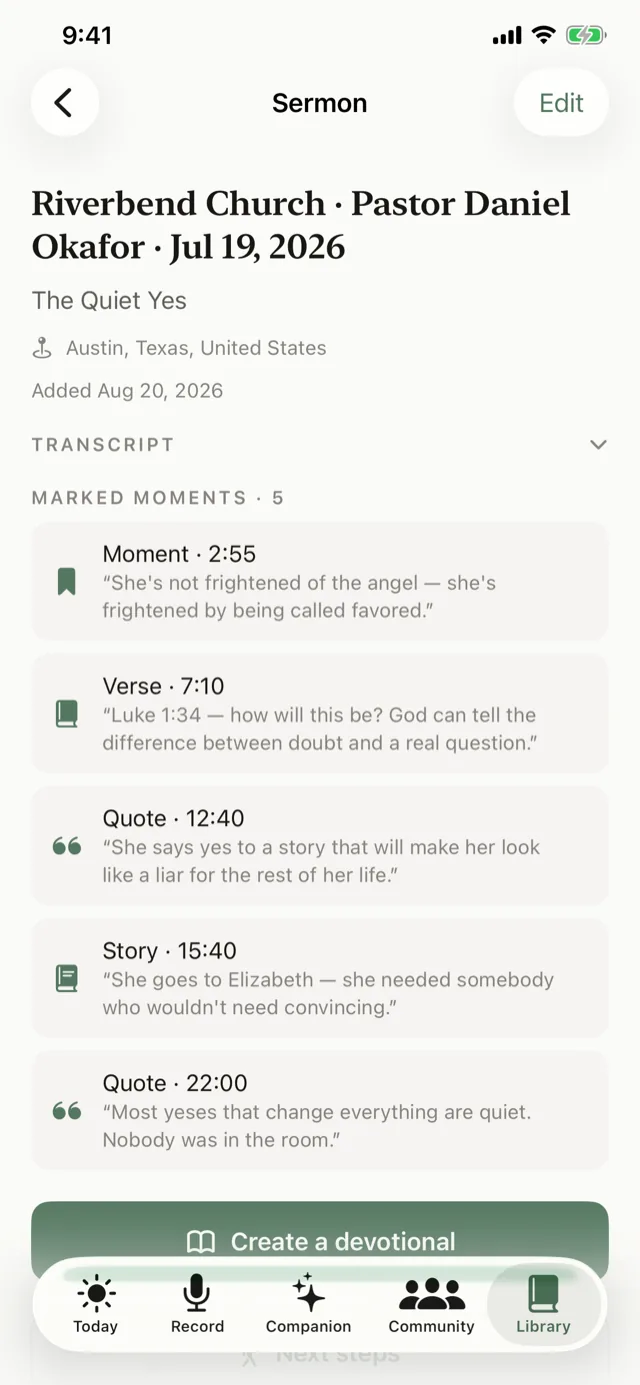
Sembrae transcribes the message, then writes the summary, the outline and the Scripture list from all of it.
- 04
Add your own
Respond in the private journal beside the notes — what struck you, what you are praying about.
- 05
Keep it through the week
Three to five applications for the days ahead — one a day in the iPhone app. Build a devotional or a study guide from the same sermon whenever you want.
Notes that know they are about a sermon
Every part of the notes is shaped by what a sermon is — a message with a point, built on Scripture, preached to be lived.
Sermon recording
Record the whole service in the iPhone app. Your audio is transcribed on your phone by Apple’s speech service and then deleted — only the text you choose to submit reaches Sembrae.
Marked moments
Verse, Quote, Story, Moment — each with its timestamp and the words around it. They feed your devotional and never appear in anyone else’s view of the sermon.
Summary and outline
A faithful few paragraphs on the message’s point and movement, and a clean outline of the points in order.
Scripture referenced
The passages the message rested on, each with a sentence on how it was used, verified against the Bible and readable in the app.
Journal and prayer
Your own reflections and prayer requests beside every sermon. Encrypted, exportable, deletable — yours.
A library you can search
Every sermon, summary and note you have added, in one place, searchable by title, speaker or church.
Generic AI notes capture information. Sembrae is built for what comes after the sermon.
A meeting-notes tool pointed at church
- Treats the sermon like a meeting: action items, participants, a transcript.
- Has no idea which sentence was the text and which was the illustration.
- Quotes Scripture from memory, sometimes wrongly, with nothing to check it against.
- Files the notes and forgets them. Nothing happens on Wednesday.
Notes shaped by what a sermon is
- Knows the message rests on Scripture, verifies every reference, and ranks the Bible above its own words.
- Lets you mark a Verse, Quote, Story or Moment while listening, and writes to what you marked.
- Turns the same notes into a daily devotional, a study guide and daily next steps.
- Keeps your notes private and free, run by a non-profit that sells nothing.
For people who want to be present on Sunday
- The note-taker who misses half the sermonPut the pen down. Record, mark what matters, and read notes that cover the whole message instead of the parts you managed to catch.
- The listener who never takes notesYou have wanted to remember more, and a blank notebook was never going to be the answer. One tap when something lands is.
- Small group leadersStart from the outline and Scripture list, then generate the study guide for this week’s meeting from the same notes.
- Anyone building a habit of rememberingNotes are the start. The devotional and the daily next steps are how the sermon keeps showing up all week.
Questions people ask
Can AI take notes during a church sermon?
Yes. With the Sembrae iPhone app you record the sermon as it is preached and tap a marker — Verse, Quote, Story or Moment — whenever something matters, instead of writing it down. Afterwards Sembrae produces the notes: a summary, an outline, the Scripture referenced, and the daily takeaways.
What do AI sermon notes include?
A two- to three-paragraph summary of the message, a clean outline of its main points in order, the key Scripture passages with a sentence on how each was used, and three to five concrete applications. Your own marked moments and journal sit beside them, private to you.
Does it transcribe the whole sermon?
Yes. A recording, an audio or video link, or a pasted transcript becomes a full transcript that Sembrae reads before writing anything. You can open the transcript itself when you want the exact words.
Are my notes and markers private?
Yes. Marked moments, journal entries and prayers are private to you, encrypted, and never added to the shared sermon record or used to train anything. A sermon you add from a public link is a shared community resource; what you write about it is not.
What is the difference between AI sermon notes and a sermon summary?
A summary is one part of the notes. Sembrae’s notes also include the outline, the verified Scripture list, your own markers and journal, and daily next steps — and the same sermon can then become a devotional or a small group study guide.
What can I use instead of taking notes through the whole sermon?
Sembrae. Record the sermon in the iPhone app and tap a marker when something matters, or add the church’s posted video afterwards. Either way you get a summary, an outline, the Scripture referenced and daily next steps without writing during the message — so you can listen instead of transcribe.
Can I still write my own notes?
Yes. Every sermon in Sembrae has a private journal beside it. Many people write less during the sermon and more afterwards, responding to the summary rather than racing the preacher.
AI that serves the church, not one that replaces it
Grounded in the message
Everything Sembrae writes is drawn from the sermon you added and the Scripture it cited, and each point is cited back to its source. It carries the message; it does not invent one.
Not a substitute
AI-written material is labeled as such and is meant to be weighed against Scripture and your pastor’s teaching — not to replace either, or your church, your small group, your own study, or prayer.
Private, and free
Your journal, prayers and notes are encrypted and never shared. Sembrae is run by a non-profit, sells nothing, and is free for every member.
Sembrae’s notes are a record of what was preached and a way to keep it — not a commentary on it. Your pastor said it; Sembrae helps you hold on to it.
More ways to carry Sunday into the week
Next Sunday, just listen.
Record the sermon, tap when it matters, and read the notes afterwards — with the Scripture, the summary, and a week of next steps waiting.